
Troubleshooting Rejected or Cancelled Japanese Online Orders
Start with the last transaction stage you can verify. Separate a rejection before order confirmation from a cancellation after submission or payment activity, then follow the strongest signal to the relevant payment, customer/address, or store-eligibility check. Correct only the supported issue and make one deliberate retry before reassessing the result.
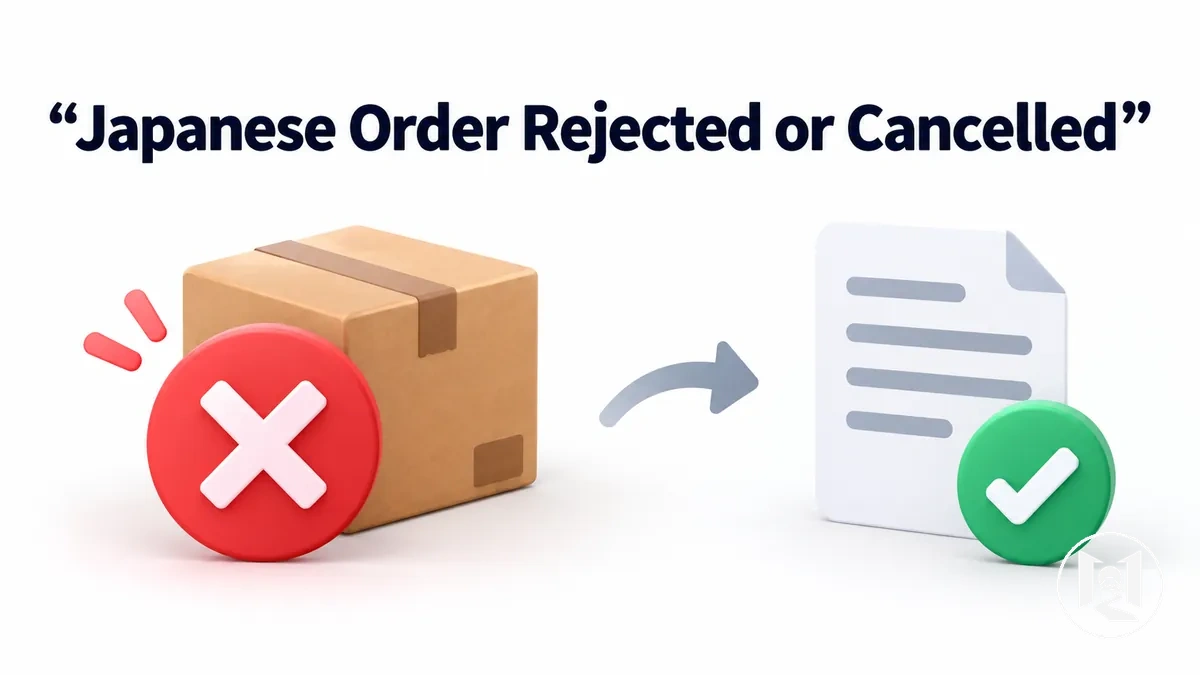
At a glance
Japanese online order troubleshooting path
Use the last confirmed stage and the most specific message or rule available. A rejection or cancellation is an outcome; the signal determines the next check.
- No confirmation or order numberClassify the problem as pre-confirmation. Check the displayed checkout error, payment submission, and any field-level validation before assigning a cause.
- Order submitted, then cancelledCompare the cancellation timing, message, and payment activity. Authorization or a visible charge does not by itself prove final merchant acceptance.
- Explicit country, destination, or customer restrictionTreat this as a store-eligibility branch; changing otherwise valid address data will not override a confirmed eligibility rule.
- Issuer signal or specific data mismatchCorrect the identified authorization, verification, billing, shipping, or customer-detail issue rather than changing unrelated inputs.
Retry rule: change one evidence-supported item, make one deliberate retry, then review the new result. If the same automatic cancellation persists after the relevant correction and no new data problem appears, stop speculative retries and confirm the remaining store, issuer, verification, or eligibility condition.
Checkout validation, payment authorization or verification, customer and address data, and store eligibility are separate transaction layers. A signal from one layer should not be treated as proof of a different one.
Use the exact checkout message, order status, bank or issuer signal, and the store's stated conditions to narrow the branch before changing any information.
Table of Contents
Identify the Point at Which the Order Failed
Identify the last transaction stage you can confirm before inferring why the Japanese online order failed.
An order confirmation, checkout error, payment activity, authorization, or cancellation notice is evidence of a transaction state, but none of these signals alone establishes the underlying cause.
The diagnostic flow organizes observable checkout stages rather than assigning causes.
Check whether the checkout stopped before an order confirmation or order number appeared, whether an on-page checkout error followed submission, whether payment activity or an authorization appeared, and whether a cancellation notice arrived after the order was submitted.
 These checkpoints place the failure within the transaction sequence and determine which diagnostic branch should be checked next.
- Before confirmation — no order confirmation or order number: classify the failure as occurring before reliable evidence of order acceptance and examine the pre-confirmation branch next.
- Before confirmation — checkout error: treat the displayed error as a signal from the checkout stage; its wording may narrow the next check but does not by itself establish the cause.
- After submission or payment activity — authorization or other payment activity: record that payment processing was attempted or reflected activity, without treating a pending authorization as confirmation that payment was captured or the order was finally accepted.
- After submission — cancellation notice: classify the problem as a post-submission cancellation and investigate what changed after the order reached that stage.
The checkpoints narrow the next diagnostic branch without establishing merchant acceptance, payment capture, or the underlying cause on their own.
The key distinction is between a rejection before confirmation and a cancellation after submission or payment activity.
Rejected Before Order Confirmation
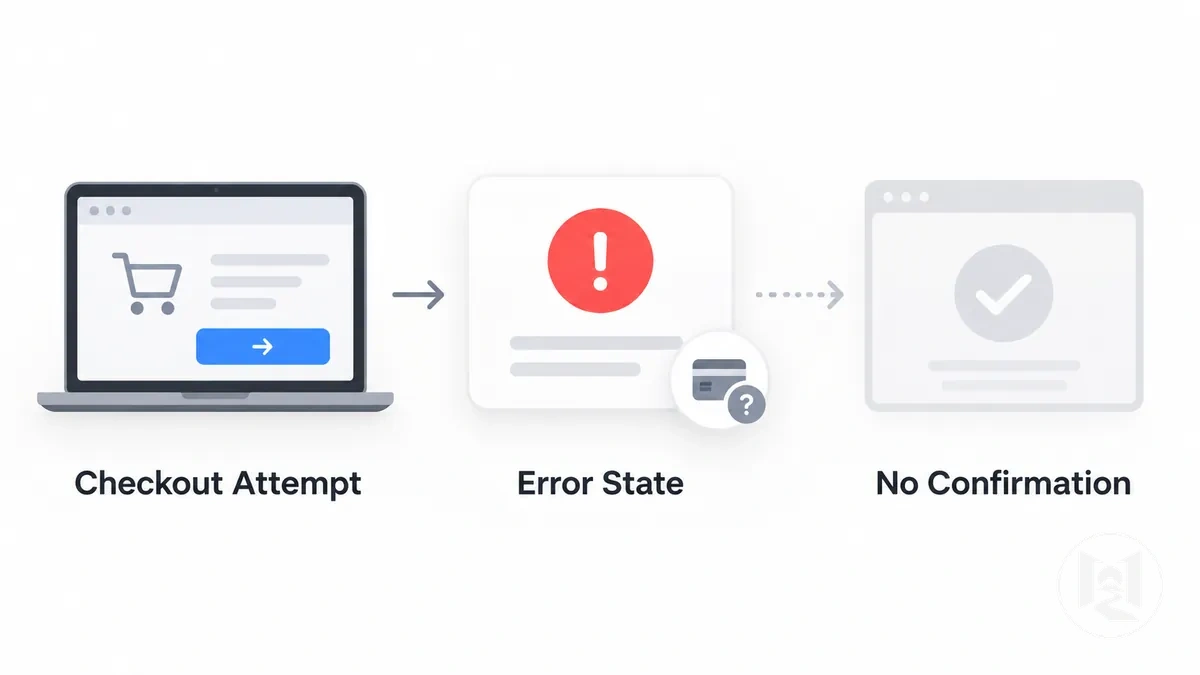
A pre-confirmation order rejection is a checkout attempt that ends without reliable evidence that the store accepted the order.
The rejected order may stop during checkout or payment submission, but the absence of an order confirmation does not by itself identify the underlying cause.
Observable signs include an error message, a failed payment submission, rejected field validation, or no order confirmation or order number after the checkout attempt.
The annotated example illustrates these pre-confirmation signals as indicators of the problem state rather than proof of one cause.
Cancelled After Payment or Order Submission
A Japanese online order can pass order submission and show payment activity yet still be cancelled later.
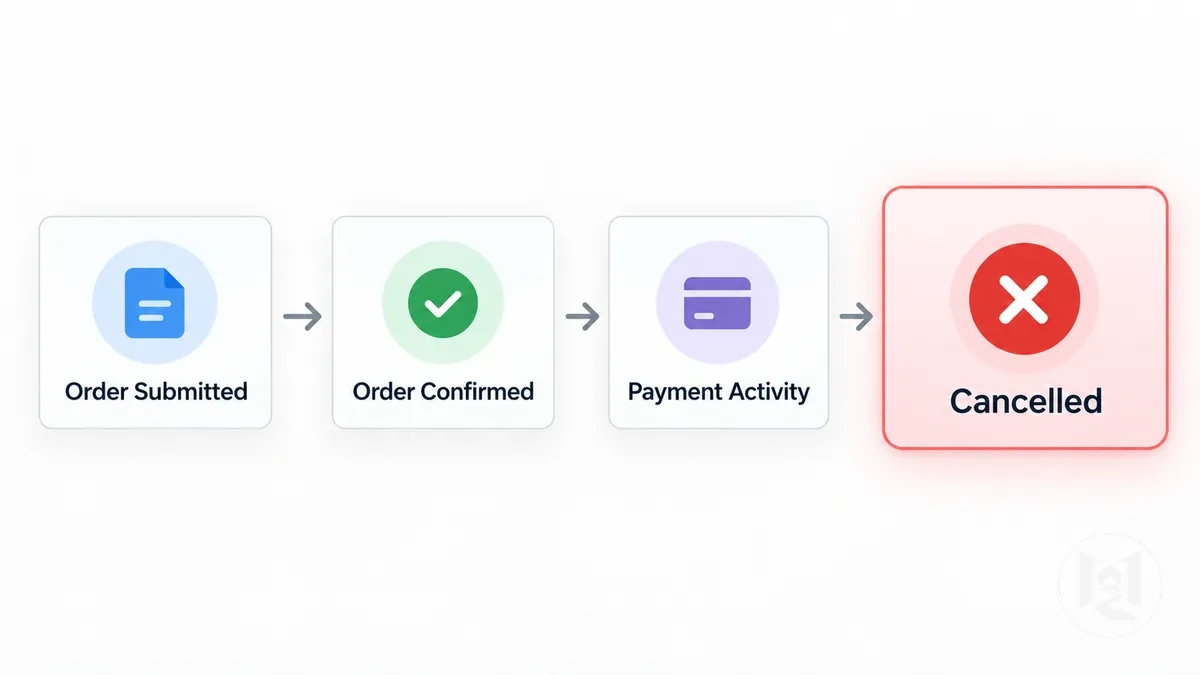
- Order confirmationThe store has recorded the submitted order. This is evidence of submission or recording, not a guarantee that every later verification or eligibility check has passed.
- Pending authorization or payment activityPayment processing has been attempted or reflected. A pending authorization is not the same as a completed capture.
- Completed chargeThis is a later payment state, but it still does not by itself prove that the order will remain accepted.
- Later cancellation noticeThe order status changed after earlier transaction activity. The cancellation establishes the change in state; its reason still requires separate verification.
Diagnostic question: what changed after submission—payment verification, customer data, destination eligibility, or another store condition?
Distinguish Checkout Failure from Overseas Order Restrictions
A checkout failure is a transaction-specific problem, while an overseas order restriction is a store-level rule affecting whether an overseas customer, destination, or direct order is eligible.
A checkout error or cancellation alone does not establish which condition applies, so distinguish transaction-specific evidence from explicit store-eligibility evidence.
Payment errors and field validation errors arise within the checkout transaction and suggest that the submitted payment or customer details require further checking.
The comparison graphic separates this checkout-error path from the store-restriction path without treating either signal as proof of a specific cause.
 These transaction signals support continued checkout diagnosis unless separate evidence shows that the store itself does not permit the order.
Store-level evidence is different: an explicit country restriction, an unsupported destination, or a stated customer eligibility rule can indicate that the direct order falls outside the store's permitted conditions.
The relevant evidence is the store's own eligibility rule or an equivalent restriction applied to the order, not the shopper's nationality or overseas location by itself.
The practical boundary is to confirm the store-specific eligibility condition before treating location as the cause.
Explicit store-level rules belong to the broader context of direct overseas ordering restrictions, whereas a payment error or field validation problem remains a transaction-specific signal unless the store's conditions establish otherwise.
The comparison table separates these evidence classes and identifies what should be verified before assigning the failure to either checkout inputs or store eligibility.
| Evidence type | What it suggests | What to verify |
|---|---|---|
| Payment or field validation error | A transaction-specific checkout failure | The payment or submitted field associated with the checkout error |
| Explicit country restriction | The direct order falls outside the store's stated country eligibility condition | The store's current country eligibility rule |
| Unsupported destination | The selected destination may fall outside the store's permitted ordering conditions | Whether that destination is explicitly supported for the direct order |
| Customer eligibility rule | The order may be restricted by a store-level customer requirement | The specific eligibility condition stated or enforced by the store |
Check Card Authorization and Payment Verification Failures
A declined payment or payment verification failure can originate from the card issuer, the merchant or payment processor, or the card details entered during checkout.
Similar failure messages can therefore reflect different authorization or verification layers rather than one definitive cause.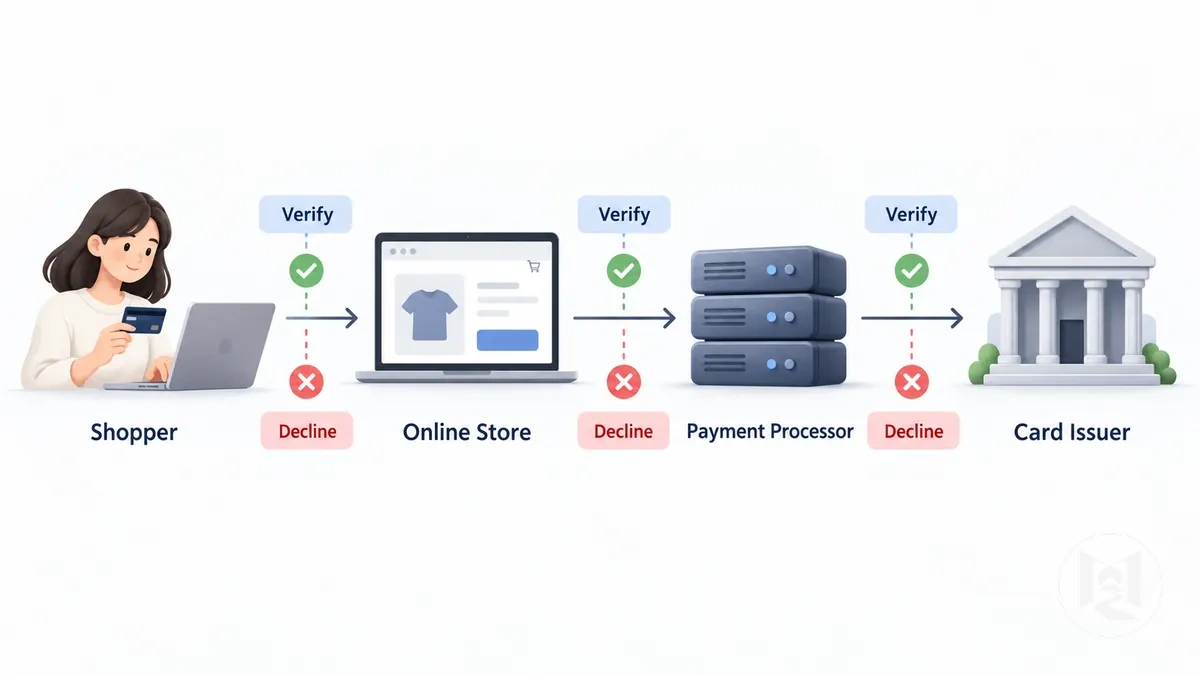
Issuer-side evidence is strongest when a bank signal or issuer message identifies an authorization refusal or security check.
A generic declined payment message is weaker evidence because it does not by itself establish whether the card issuer, payment processor, or another verification step produced the failure.
A checkout-specific verification failure may instead suggest a merchant or payment processor verification problem, while an error that specifically identifies card details, cardholder information, or billing information suggests checking the entered verification data.
A card working elsewhere does not establish that the same transaction will pass the verification requirements of a particular Japanese online store.
Use the observable message and any available bank signal to select the next diagnostic branch.
The table separates issuer-side decisions, merchant or processor verification, and entered-detail mismatches as evidence classes rather than definitive or mutually exclusive causes.
| Observed signal | Possible source | Check | Interpretation |
|---|---|---|---|
| Bank signal or issuer message identifies an authorization refusal | Card issuer | Confirm the transaction status and available decline information with the card issuer | Supports an issuer-side authorization failure; the specific reason depends on the issuer's information |
| Generic declined payment message without a confirmed bank-side reason | Card issuer, merchant, or payment processor | Compare the checkout message with any available bank signal before assigning the failure | The visible decline alone does not identify which layer refused or failed to verify the transaction |
| Checkout reports a payment verification failure without a confirmed issuer decline | Merchant or payment processor verification layer | Check which verification step failed and whether the store provides a specific verification message | Suggests the merchant or processor verification branch rather than a confirmed issuer refusal |
| Checkout specifically flags card details, cardholder information, or billing information | Entered verification data | Check the identified details against the information intended for the transaction | Suggests an entered-detail mismatch when the checkout specifically identifies that data |
Foreign-Issued Card Rejection
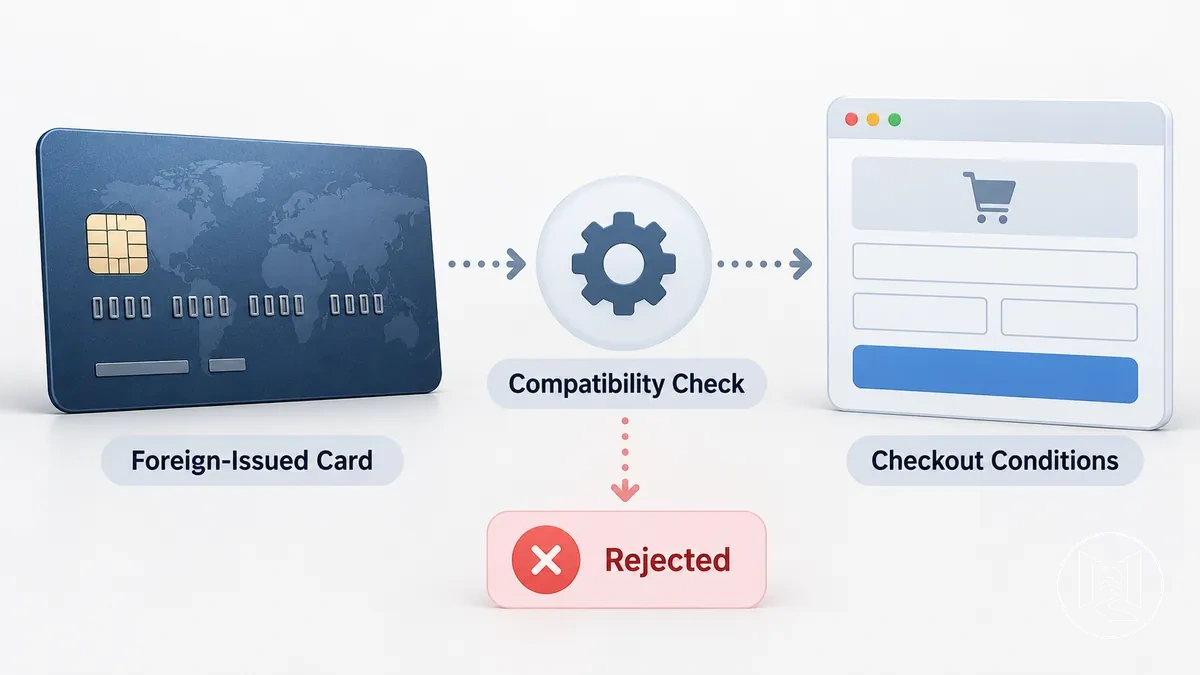
Card-Issuer Authorization or Security Check Failure
A card issuer can refuse authorization or interrupt an online transaction through an issuer-side security check, but the merchant's visible decline message may not identify that decision precisely.
An issuer-confirmed authorization refusal is stronger evidence of an issuer-side cause than a generic merchant-visible payment refusal.
Use issuer-side evidence to test this cause rather than assigning a specific reason from a generic decline message.
Relevant checks include an issuer decline notice, online or international transaction controls, security verification, account status, and available funds.
Each check is useful only to the extent that the issuer or another reliable bank signal identifies that condition for the transaction.
A merchant-side verification error remains different evidence when no issuer authorization or security condition has been confirmed.
- Issuer decline notice: an explicit decline message from the card issuer supports an issuer-side authorization failure; a generic merchant decline does not establish the same conclusion.
- Online or international transaction control: an issuer-confirmed restriction on the relevant online or international transaction supports that control as the reason authorization did not proceed.
- Security verification: an issuer message tied to a security check supports an issuer-side verification condition; a generic decline does not confirm fraud screening or another specific security process.
- Account status: an issuer-confirmed account restriction or status problem supports an issuer-side cause, while the merchant's checkout message alone does not establish the account condition.
- Available funds: an issuer-confirmed funds-related refusal supports that explanation; without such evidence, insufficient funds should not be inferred from the rejected transaction alone.
Payment Details or Cardholder Verification Mismatch
Payment verification can fail when entered payment details or cardholder information do not match the information required by the checkout or held in the relevant issuer record.
A mismatch is one possible cause of a verification failure, but a similar error can also result from issuer security controls or payment processor conditions.
Verify each field against its appropriate reference rather than entering substitute information.
Exact field and formatting requirements vary by checkout, so the checklist checks consistency between the submitted data, the card itself, and issuer-held information; matching every item does not guarantee payment acceptance.
- Cardholder name: compare the entered cardholder name with the name required by the checkout and the corresponding issuer record where applicable; a confirmed difference may prevent verification.
- Billing address: when the checkout requests a billing address for verification, compare it with the billing information associated with the card or issuer record; do not use unrelated substitute details to satisfy the field.
- Card number: verify that the entered card number matches the card being used and contains no transcription error; an incorrect number may prevent verification of the intended card.
- Expiry: verify the entered expiry against the card and the format requested by the checkout; incorrect expiry information may prevent verification.
- Security code: when requested, compare the entered security code with the code on the relevant card; an incorrect value may produce a verification failure.
When these payment details match their reference information but verification still fails, the error does not by itself confirm a data mismatch.
Treat mismatch as the cause only when the checkout, payment processor, or issuer evidence identifies the submitted verification data as inconsistent.
Check Address and Customer-Detail Failures
For diagnosis, classify an address or customer-detail failure into one of two branches: incorrect or incompatible customer information, or a destination eligibility restriction.
A checkout error or field validation message can indicate which branch to check, but an overseas location by itself does not prove that the destination is unsupported.
For the data branch, compare the entered billing address, shipping address, and other required customer information with the fields and address format requested by the checkout.
A field-specific error suggests checking the value or format of that field, while successful field validation means only that the submitted data passed that stage; it does not establish that the order meets every store condition.
Keep billing and customer-data mismatches separate from destination rules unless the store explicitly connects the error to country or shipping eligibility.
For the eligibility branch, check whether the store identifies the selected country, shipping address, or destination as unsupported.
A correctly formatted address can still fail when the destination is outside the store's permitted ordering conditions, while an address-format error does not by itself establish a destination restriction.
The table separates these categories for diagnosis rather than treating any single checkout error as proof; use the mismatch or format branch for field-level failures and the destination branch when the store explicitly rejects the country or destination.
| Observed issue | Check | Likely category |
|---|---|---|
| Billing address or customer information is rejected by field validation | Compare the entered value with the field requirements and address format shown by the checkout | Billing or customer-information mismatch or format issue |
| Shipping address produces a field-level validation error | Check the shipping address fields and required format before inferring a destination restriction | Shipping-address validation or format issue |
| The store explicitly identifies the country or destination as unsupported | Verify the store's stated destination eligibility or country rule for the order | Unsupported country or destination |
Billing, Shipping, or Customer-Information Mismatches
Match each detail to the correct reference
- Billing information
- Compare it with the issuer-held billing details used for verification when the checkout requests them.
- Shipping information
- Compare it with the intended delivery address and the checkout's required shipping fields; correct factual typos or supported format errors only.
- Customer information
- Compare each required value with the store requirement shown for that field.
- Correction boundary
- Correct a confirmed mismatch in the matching data category. Do not change unrelated billing, shipping, or customer information to compensate for a different failure.
A mismatch is a plausible explanation only when the conflicting value is established. Do not invent substitute details merely to make a field pass validation.
Unsupported Overseas Address or Country
Correct the Identified Failure Before Retrying
Correct only the identified failure supported by the observed signal before retrying the order.
Make one evidence-supported correction at a time so the controlled retry remains diagnostically useful; correcting one plausible failure source does not guarantee order acceptance.
Before changing any input, verify the relevant payment details, customer details, store conditions, issuer conditions, destination eligibility, or validation requirement associated with that failure class.
Confirming the prerequisite first keeps the correction tied to the evidence rather than introducing a new variable.
Avoid changing several fields at once or making repeated retries without new evidence, because that makes the result harder to interpret and may create additional payment activity.
Use one deliberate retry after the supported correction, then review the new result before deciding what to check next.
- Confirm the failure class: identify whether the prior evidence points to payment details, customer details, store conditions, issuer conditions, destination eligibility, or another already diagnosed cause, and verify the signal supporting that classification.
- Correct the relevant item: change only the payment details, customer details, or condition directly connected to the identified failure, then verify that the corrected value matches its proper reference.
- Verify prerequisites: confirm that the relevant store conditions, issuer conditions, and checkout validation requirements are satisfied before submitting the order again.
- Retry deliberately: submit one reattempt using the verified correction rather than making additional speculative changes during the same retry.
- Review the result: compare the new checkout result with the previous failure signal to determine whether the corrected input removed that failure source or whether another diagnostic branch still needs attention.
Correct a Card Authorization or Verification Failure
Retry a payment only after confirming whether the identified failure comes from incorrect card details, an issuer-side authorization or security condition, or a payment method that the store does not support.
The corrective action should match that diagnosed source rather than treating every decline or payment verification error as the same problem.
An issuer-confirmed decline requires checking the issuer status or any security prompt tied to that transaction, while a merchant-side verification error requires checking the submitted card details and the store's payment conditions.
Corrected information or issuer authorization can remove one identified failure source, but neither guarantees merchant acceptance of the order.
- Verify the card details: compare the entered card number, expiry, security code, cardholder information, and any requested billing data with their correct reference information; move on only when no relevant mismatch remains.
- Check issuer authorization: if the issuer confirms the decline or identifies an authorization restriction, verify the issuer status associated with that transaction before another attempt.
- Complete any issuer security prompt: when the issuer presents a security prompt or verification requirement, confirm that the required check has been completed successfully before retrying; do not infer a security problem from a generic merchant error alone.
- Confirm payment-method support: verify that the payment method is supported under the store's current checkout conditions rather than assuming issuer approval means the merchant will accept it.
- Retry and review the result: make one deliberate retry after the relevant correction and verification, then compare the new result with the earlier decline or verification error to determine whether that failure source has been removed.
Correct Address or Customer Details
Correct any factual mismatch or supported formatting error in the billing address, shipping address, or customer details before retrying, but do not reformat valid information to overcome a confirmed destination eligibility restriction.
A correction may resolve a validation problem when the entered data conflicts with the relevant reference or required field, but it does not override a store policy that excludes the destination.
The corrective check depends on the type of problem.
A typo or factual mismatch can be corrected against the appropriate billing, shipping, or customer-information reference, whereas an unsupported destination remains an eligibility condition rather than a format problem.
- Compare the billing address: check the entered billing address against the relevant issuer record and correct only a confirmed mismatch or supported required-field error.
- Compare the shipping address: verify the shipping address against the intended delivery details and the checkout's required fields, then correct any factual typo or supported format error.
- Verify customer details: compare the submitted customer information with the store requirement for each required field and correct values that are factually wrong or do not meet the stated field format.
- Recheck destination eligibility: confirm whether the destination remains eligible under the store's conditions; a valid address cannot be corrected into eligibility when the destination itself is unsupported.
- Retry only when appropriate: if the problem was a correctable data or validation error and no destination restriction has been confirmed, retry with the corrected information and review the new result. If the destination is explicitly unsupported, further address reformatting is not a corrective action.
Diagnose Repeated Automatic Cancellations
Repeated cancellation: compare the pattern before retrying
Repeated automatic cancellation means a persistent condition remains unresolved, but the repeated outcome does not identify which condition.
- Compare the same stage across attemptsRecord the cancellation timing, message wording, order status, and any payment authorization, verification, or charge activity.
- Compare payment evidence after submissionIf each attempt reaches submission before cancellation, note whether the payment state changes after a targeted payment correction.
- Compare data and eligibility evidenceA field-specific validation issue points toward submitted data; an explicit country, destination, or customer rule points toward store eligibility.
- Retry only when the evidence changesAnother attempt is justified when a remaining correctable condition is identified, such as a confirmed verification mismatch or factual address error.
Stopping rule: if the same cancellation returns after the relevant correction and no new evidence identifies another data problem, stop treating it as a simple checkout-entry error. Confirm the remaining store, issuer, verification, address, or eligibility condition before any further attempt.